The fastest way to keep a recipe you have just found is to paste its link somewhere that will read it for you. Everything else — the bookmark, the screenshot, the tab left open for three weeks — works right up until the moment you actually want to cook the thing.
Here is what each of the usual methods is really doing, and when it lets you down.
The bookmark
A bookmark keeps an address, not a recipe. That is fine while the page is where you left it, and the page usually is. What changes is everything around it: the site gets redesigned, the recipe moves behind a newsletter wall, the food blog stops paying for hosting. A bookmark folder is a list of promises made by other people.
It is also the worst of the four to cook from. You are standing in a kitchen with wet hands, and the page wants to autoplay a video and ask about cookies before it will show you how much butter.
The screenshot
Screenshots solve the disappearing-page problem and create a new one: your camera roll. A recipe becomes three or four images with no title, filed between a parking space and a photo of a friend’s dog. Search cannot help you, because there is nothing to search. In six months you will remember that you saved a good braise and you will not find it.
Screenshots are still worth taking. Take them, and then get them out of the camera roll the same week.
Copying the text into notes
This is better than it sounds. A recipe pasted into a notes app is real text that survives the website, and it is searchable. What it lacks is structure: nothing knows which lines are ingredients and which are steps, so nothing can scale the amounts, tick anything off, or run a timer. You get an archive, not a kitchen tool.
It also takes the longest, which means in practice you do it for the recipes you already know you love and never for the ones you were only curious about.
Reading the page into an app
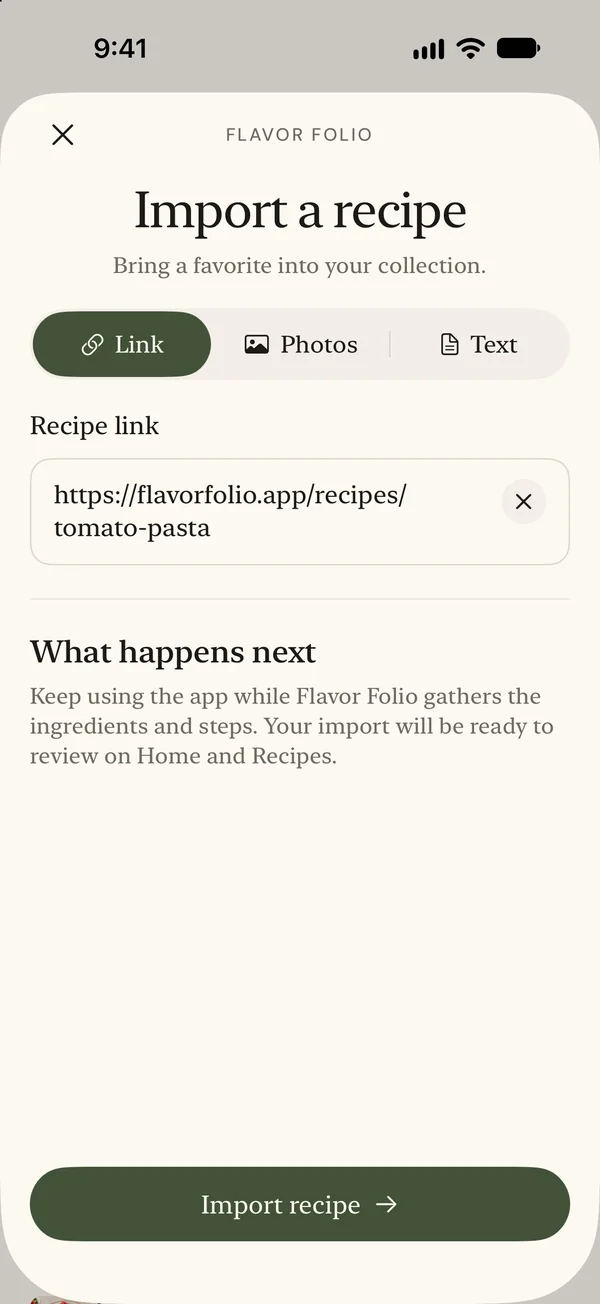
The version that holds up is the one where something else does the reading. You give it the link; it fetches the page, prefers the recipe markup the site already publishes when there is any, and comes back with ingredients as ingredients and steps as steps.
That structure is the whole point. Once a recipe is in pieces rather than in a paragraph, a servings stepper can scale numeric ingredient amounts, cooking mode can keep ingredient checks beside the current instruction, and timed steps can carry an adjustable countdown. Instructions, temperatures, and cooking times stay as written when servings change.
Flavor Folio does this from a link, from up to three photos of a cookbook page, or from text you paste in — the Collect page walks through all three.
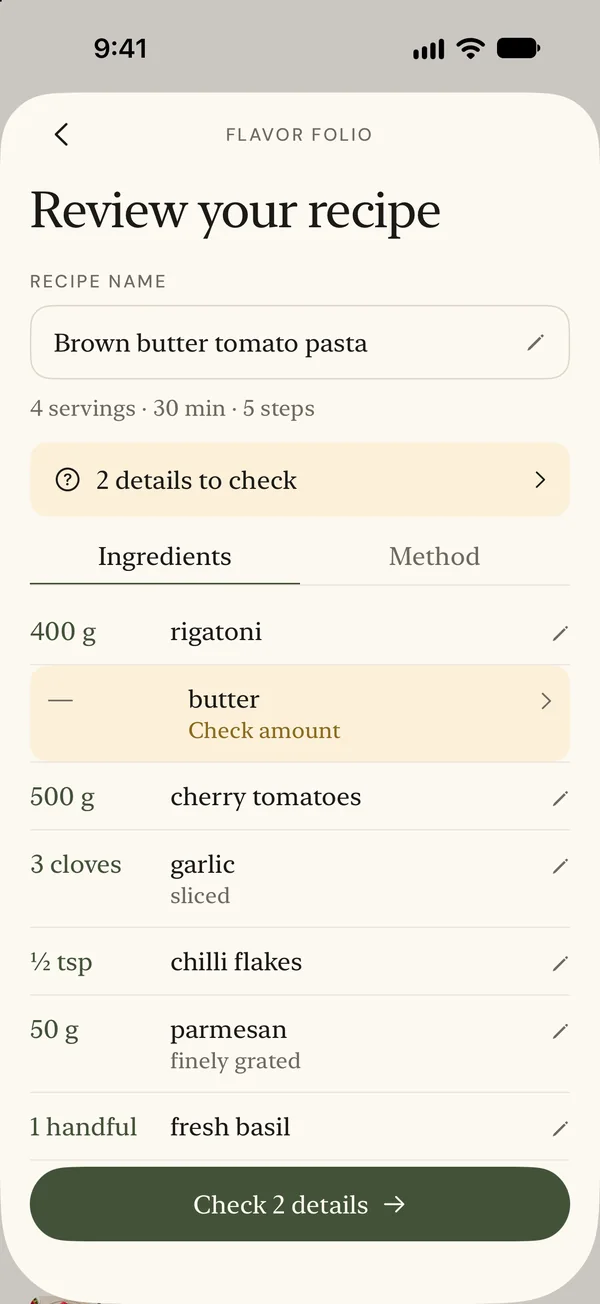
That review step matters more than it sounds. Reading a recipe off a page is guesswork at the edges — a quantity written in shorthand, an ingredient named two ways — so it helps to have a chance to check the result. Guided checks call out specific missing details, but they cannot catch every mistake. Read through the ingredients and method against the source before you save.
What to do with the backlog
If you already have the bookmark folder and the camera roll, do not try to clear them in one evening. Take the ten recipes you have actually cooked twice, bring those in first, and let the rest sit. A collection of ten things you cook is more use than an archive of four hundred you meant to.
Then, from now on: when you find a recipe, keep it before you cook it. The moment you are most likely to lose it is the moment you decide you will save it properly later.